
Platform Engineering emerges as a response to the growing complexity of cloud applications. This evolution reflects how platform engineering has matured into a structured discipline with standardized principles and practices. We create internal platforms that automate infrastructure and governance. The platform is treated as a product: the developer is the internal customer and should find the “golden path.” A good definition of platform engineering summarizes its purpose: “to improve security, compliance, costs, and time-to-value for development teams through enhanced developer experiences and self-service in a secure, governed environment.” By standardizing processes and offering ready-made automations, platforms eliminate repetitive steps and drastically reduce developers' cognitive load.
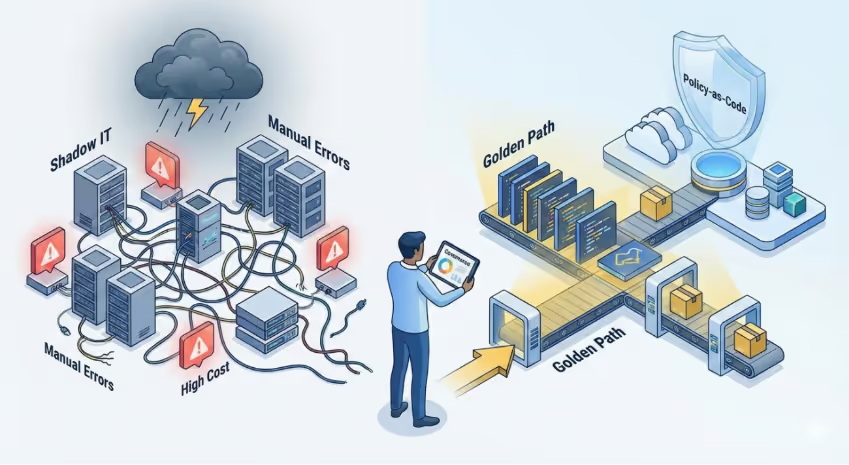
Without this integrated governance, we face risks of excessive costs, security failures, and non-compliance. Teams may create resources in expensive or unmonitored regions, forget mandatory tags, or inadvertently expose APIs. Platform Engineering ensures compliance by creating automated guardrails: each guardrail automatically adds best practices. This reinforces security and compliance in an invisible and natural way for developers, accelerating delivery instead of blocking it.
What is Policy-as-Code (PaC)
Policy-as-Code is the paradigm of encoding business, security, and compliance rules as executable, versioned, and testable code in pipelines. Instead of manual reviews, changes are automatically validated. In practice, rules like “only use encrypted VMs” or “do not create resources outside approved regions” become policy definitions in JSON (or Rego, YAML, etc.), stored in a Git repository. This ensures fast, continuous feedback: violations are detected as early as possible, preventing incorrect resources from reaching production.

When we implement PaC, we shift from a “do and audit later” model to “validate before deployment.” As highlighted by the platform engineering community, called "CAPOC" (Compliance At Point Of Change) – the feedback cycle is compressed from days to seconds. For example, if a developer tries to deploy a vulnerable container, a policy engine (OPA or Kyverno) immediately rejects it, returning readable errors. Security teams remain centralized but are no longer bottlenecks; each team retains autonomy because automated policies ensure only approved configurations go live. Additionally, every event creates native audit trails, making compliance evidence easier.
Policy tooling ecosystem
The PaC universe is broad and generally cloud-agnostic. Several tools allow implementing policies at different layers:
OPA (Open Policy Agent)
Open Policy Agent is a CNCF-graduated open-source policy engine. It uses the Rego language to define general rules and can be integrated into applications, API gateways, CI/CD pipelines, and Kubernetes clusters. It's ideal for multi-cloud and generic authorization scenarios, offering good performance and detailed audit trails. With OPA, you declare rules in Rego and validate decisions at the point of change (CAPOC), ensuring fast and consistent feedback.
Kyverno
Kyverno is a declarative Kubernetes-native PaC tool. Policies in YAML validate, generate, and can even mutate resources (e.g., automatically add missing labels). Being native to Kubernetes, it usually has a gentler learning curve for platform engineers and keeps up with modern ecosystem features.
Conftest
Conftest is based on OPA and validates infrastructure-as-code files before apply (Terraform, Kubernetes YAML, Helm, CloudFormation, etc.). Policies are written in Rego and tests are run in CI/CD or locally (e.g., \conftest test ./infra\). This captures violations early (disallowed VM types, missing mandatory tags), preventing invalid deployments and reducing rework.
Azure Policy
Azure Policy is Azure's native solution with a compliance dashboard, built-ins, and integration with pipelines and CI. I wrote a detailed article on Azure Policy in practice. Other providers have equivalents: AWS Service Control Policies (SCPs) and AWS Config Rules; GCP Organization Policies. These native policies are ideal for universal application of each cloud's specific rules.
My specialty is Azure cloud, where I feel most comfortable. Recently, we created an internal Policy-as-Code project with Terraform: we put the policies (.json files) in a repository folder and Terraform applies these definitions automatically for the entire organization. This flow ensures consistency, versioning, and the ability to apply policies centrally, guaranteeing governance at scale without relying on manual processes.
An example of Azure Policy
A practical example of Azure Policy I implemented in production environments was: "Azure Backup should be enabled for Virtual Machines" (ID: 013e242c-8828-4970-87b3-ab247555486d) to audit VMs without a backup item associated with a Recovery Services Vault. For step-by-step and remediation options (Portal, Azure Policy), see: Azure Backup for Virtual Machines.
DevEx flow with integrated governance
To avoid hindering developer experience (DevEx), policy checks should occur at every stage:
- IDE/Local: extensions (VSCode, IntelliJ) validate IaC and alert about violations before commit (e.g., forbidden region, missing tag).
- CI/CD (pre-merge): a dedicated job (policy-test) runs Conftest/OPA/Azure CLI Policy and blocks non-compliant PRs with clear messages.
- Admission Controllers (Kubernetes): Gatekeeper or Kyverno deny invalid deployments (unauthorized image, improper ports) and can mutate resources to fix patterns.
- Runtime Cloud: Azure Policy, AWS Config, etc., continuously audit; compliance dashboards show status and facilitate quick remediation.
FinOps best practices
According to the FinOps Foundation, best practices include:
- Mandatory tags: owner, costCenter, environment, basis for cost allocation and accountability.
- SKU/environment limits: restrict VM types and SKUs (avoid surprises in dev/staging).
- Automatic shutdown: stop dev/sandbox resources after hours (Azure Automation/Runbooks/Stop schedules).
- Budgets and alerts: set budgets (e.g., 80% of forecast) and attach alerts to the pipeline; fail deployments when limits are exceeded.
- Visibility and analytics: export costs to Analytics/Power BI; use Azure Cost Management/AWS Cost Explorer for FinOps dashboards.
Example: an Azure Landing Zone already comes with mandatory tagging and budgets as part of the foundation.
Policy deployment strategy
When adopting PaC and governance policies, do a gradual and iterative rollout:
Audit → Warn → Block → Remediate: start by monitoring (Audit mode) to understand impacts without interrupting processes. Then move to visible warnings, and only then to Deny or Modify actions. Active communication between IT and DevOps teams is crucial at each phase.
Quick wins: start with simple, high-impact policies like deployment region and mandatory tags. They're easy to understand and will yield quick results. As confidence grows, evolve to more critical rules.
Clear messages: policies should have obvious descriptions. Generic errors like "Policy Failed" are not helpful – prefer specific feedback ("Invalid region: use East US or West Europe").
30/60/90 day plans: many teams define maturity timelines. For example, in 30 days inventory desired policies and enable audit mode, in 60 days integrate tests in CI and use admission controllers in staging, and in 90 days enable blocks in production for critical rules and automate remediations. Thus, governance becomes a continuous enabler, not an emergency obstacle.
Integrating Policy-as-Code into platform engineering turns governance into an ally, not a bottleneck. When security, compliance, and cost policies are incorporated into daily life in an automated way, they become invisible to the user – the team just sees the “rules of the game” working in the background. As a result, teams deliver faster and with less risk: there is no longer a “no team” blocking requests, but rather automatic guidance that steers development.